
Quick Fix: Resolve Common Application Errors for Product Testing in Under 10 Minutes
In the fast-paced world of product development and quality assurance, encountering application errors during testing is not just a possibility; it’s an inevitability. The true challenge, however, lies not in preventing them entirely, but in developing the ability to quickly and efficiently resolve these common application errors. Downtime due to unresolved bugs can significantly impact project timelines, inflate costs, and ultimately delay market entry. This comprehensive guide is designed to equip product testers, QA engineers, and developers with the knowledge and actionable strategies required for rapid application error resolution, ensuring minimal disruption and maximum efficiency in your testing cycles. Our goal is to empower you to identify, diagnose, and fix most common application errors in under 10 minutes, transforming potential roadblocks into minor speed bumps.
The pressure to deliver flawless products is immense, and every minute spent troubleshooting an error is a minute lost. This article delves into the most prevalent application errors encountered during product testing, offering step-by-step quick fixes that prioritize speed and effectiveness. We’ll explore everything from environment configuration issues to data integrity problems, providing practical advice that you can implement immediately. By focusing on rapid diagnosis and targeted solutions, we aim to streamline your testing process, allowing you to maintain momentum and ensure your products meet the highest standards of quality.
Anúncios
Understanding the Landscape of Common Application Errors
Before diving into solutions, it’s crucial to understand the types of application errors that frequently plague product testing. Categorizing these errors can help in developing a systematic approach to application error resolution. While the specific manifestation of an error can vary wildly, they often fall into a few broad categories:
- Configuration Errors: These are often the easiest to fix but can be the most frustrating to diagnose. They stem from incorrect settings in environment variables, database connections, API keys, or third-party service integrations.
- Runtime Errors: These occur when the application is running and encounters an unexpected condition, such as a null pointer exception, division by zero, or an unhandled exception. They often indicate logical flaws in the code.
- Data-Related Errors: Problems arising from incorrect, missing, or malformed data. This can include issues with database queries, data serialization/deserialization, or data validation failures.
- Connectivity Issues: Errors related to network problems, inaccessible servers, or failed API calls. These are particularly common in distributed systems or applications relying heavily on external services.
- Permission Errors: The application or a specific user lacks the necessary permissions to access a file, directory, database, or perform an operation.
- Resource Exhaustion: Running out of memory, CPU, or disk space, leading to application crashes or slowdowns.
Recognizing the category an error belongs to is the first step towards a quick fix. Often, a specific error message, even if cryptic, can provide clues that point towards one of these categories. Developing an intuition for these classifications significantly speeds up the application error resolution process.
Anúncios
The 10-Minute Rapid Troubleshooting Framework for Application Error Resolution
Our goal is to resolve common application errors within a tight 10-minute window. This requires a structured, yet agile approach. Here’s a framework you can adopt:
Minute 1-2: Observe and Document the Error
The first step in effective application error resolution is to precisely understand what went wrong. Don’t just restart the application. Instead:
- Capture the Error Message: Take a screenshot or copy the exact error message, including any stack traces. This is your most valuable clue.
- Note Down Reproduction Steps: What actions led to the error? Can you reliably reproduce it? This helps confirm if it’s a consistent bug or an intermittent glitch.
- Identify Context: Which part of the application, which module, or which specific functionality was being used when the error occurred?
This initial observation phase is critical. A well-documented error can save hours of debugging later. Even if you’re under pressure, resist the urge to immediately try random fixes. A systematic approach is faster in the long run.
Minute 3-4: Initial Checks – The Low-Hanging Fruit
Many common application errors are due to simple oversight. These quick checks often provide immediate application error resolution:
- Restart the Application/Server: Sometimes, a simple restart can clear transient issues, memory leaks, or hung processes.
- Check Network Connectivity: Is the internet working? Can the application reach its required endpoints (databases, APIs, external services)? Use
pingorcurlcommands if applicable. - Verify Configuration Files: Are all environment variables correctly set? Are database connection strings accurate? Are API keys valid? Even a single typo can cause significant errors.
- Review Recent Changes: Has anything in the environment or codebase changed recently? A new deployment, a configuration update, or a system patch could be the culprit.
- Check Disk Space/Memory: Is the server running out of resources? A quick check of system metrics can reveal resource exhaustion.
These checks are quick, require minimal technical depth, and often resolve a surprisingly large percentage of errors. They are your first line of defense in rapid application error resolution.
Minute 5-7: Dive into Logs and Diagnostics
If the initial checks don’t yield a solution, it’s time to consult the logs. Application logs are an invaluable resource for understanding the internal state and flow of an application leading up to an error. For effective application error resolution:
- Locate Relevant Logs: Know where your application, web server (Apache, Nginx, IIS), database, and system logs are stored.
- Filter for Errors/Warnings: Use tools like
grep(Linux/macOS) or Notepad++’s search (Windows) to quickly find keywords like “ERROR,” “FATAL,” “EXCEPTION,” or “WARNING” around the timestamp of the error. - Analyze Stack Traces: If present, a stack trace tells you exactly where in the code the error originated. This is gold for developers. Look for the line number and method name.
- Check External Service Status: If your application relies on third-party APIs (e.g., payment gateways, authentication services), check their status pages for outages.
Learning to quickly parse logs is a skill that dramatically improves your application error resolution capabilities. Look for patterns, repeated errors, or sequences of events that precede the failure.
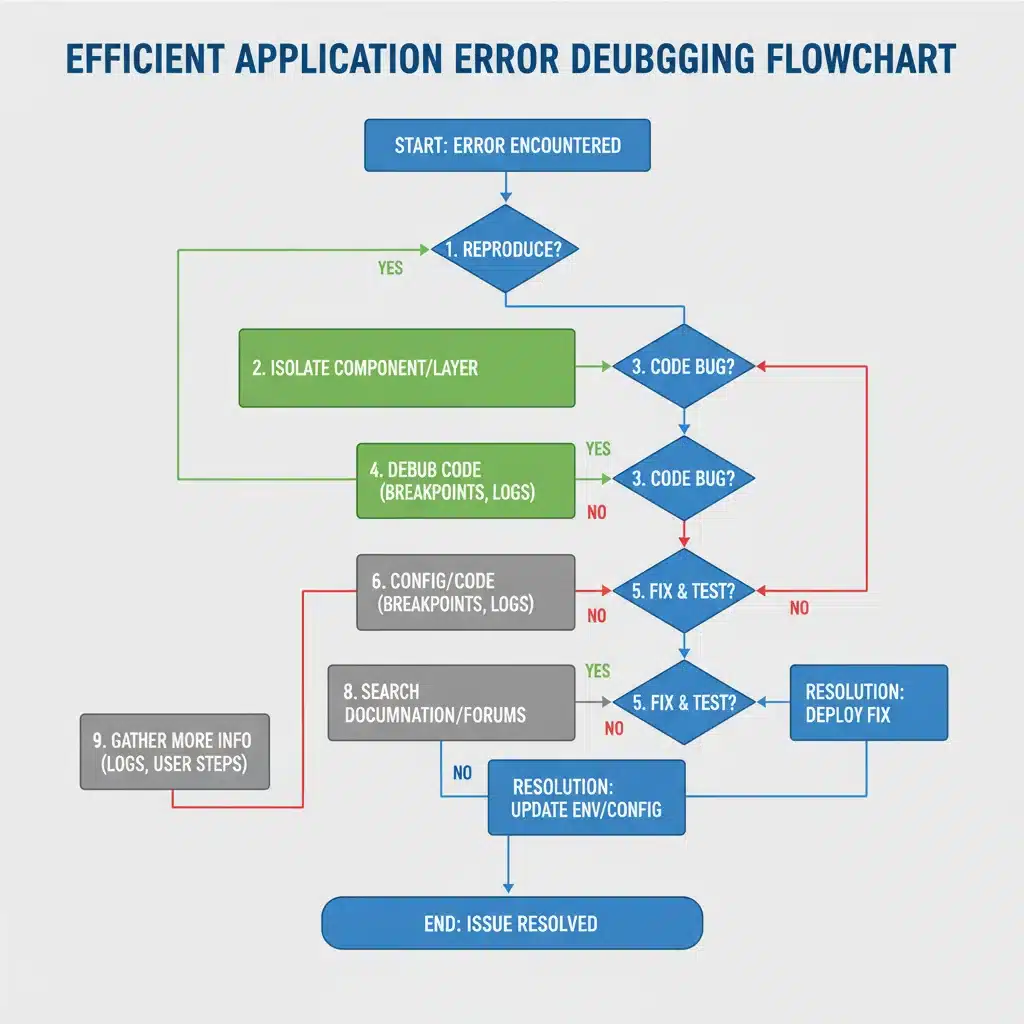
Minute 8-10: Targeted Solutions & Escalation
Based on your findings from the logs and initial checks, you should now have a strong hypothesis about the root cause. This final phase focuses on implementing a targeted fix or escalating effectively.
Common Scenarios and Quick Fixes:
- “File Not Found” or “Module Not Found” Errors:
— Quick Fix: Verify file paths, check deployment packages, ensure all dependencies are installed. Often a missing library or incorrect build path. - “Database Connection Failed” Errors:
— Quick Fix: Check database server status, verify credentials (username, password), ensure the database host/port is correct, check firewall rules allowing connection. - “Permission Denied” Errors:
— Quick Fix: Review file/directory permissions (chmod,chownon Linux; security settings on Windows), check user roles and permissions within the application or database. - “Null Pointer Exception” / “Undefined Variable” Errors:
— Quick Fix: These often require code changes. If you have immediate access to the codebase, check the line indicated in the stack trace. For testing, try providing default values or ensuring the object/variable is initialized before use. This is where a developer might need to step in. - HTTP 5xx Errors (Server Errors):
— Quick Fix: Check web server logs for more specific errors. Could be application code crashing, misconfigured server, or resource issues. Restarting the web server or application pool can sometimes temporarily resolve it.
When to Escalate:
If after 10 minutes (or less, if the solution isn’t obvious) you haven’t found a clear path to application error resolution, it’s time to escalate. Provide all your gathered information:
- Exact error message and stack trace.
- Detailed reproduction steps.
- Logs from relevant components.
- List of checks already performed and their outcomes.
Effective escalation is itself a form of quick resolution, as it brings in specialized expertise with all the necessary context. This prevents you from spending unproductive hours on an issue beyond your immediate scope.
Preventive Measures to Minimize Application Errors
While rapid application error resolution is crucial, preventing them in the first place is even better. Implementing robust preventive measures can significantly reduce the frequency and severity of errors during product testing.
- Automated Testing: Implement a strong suite of unit, integration, and end-to-end tests. Automated tests catch regressions and errors early in the development cycle, long before manual testing.
- Thorough Code Reviews: Peer code reviews can identify potential bugs, logic errors, and bad practices before they become production issues.
- Standardized Environments: Ensure development, staging, and production environments are as similar as possible to avoid “works on my machine” syndrome. Use containerization (Docker) or virtual machines for consistency.
- Comprehensive Logging and Monitoring: Implement structured logging with different levels (DEBUG, INFO, WARN, ERROR) and integrate with monitoring tools (e.g., ELK stack, Prometheus, Grafana). This provides visibility into application health and helps proactively identify issues.
- Version Control Best Practices: Use Git effectively, with clear branching strategies and regular merges to prevent integration conflicts and ensure code stability.
- Data Validation: Implement robust input validation at all layers of the application to prevent malformed or malicious data from causing errors.
- Dependency Management: Keep track of all third-party libraries and their versions. Regularly update dependencies to patch known vulnerabilities and bugs, but test updates thoroughly.
- Documentation: Maintain up-to-date documentation for application architecture, deployment procedures, and common troubleshooting steps. This empowers testers and new team members to resolve issues independently.
Investing in these preventive measures might seem like an upfront cost, but they pay dividends by reducing the time and effort spent on reactive application error resolution, ultimately leading to higher quality products and faster release cycles.
Advanced Techniques for Deeper Analysis (If 10 Minutes Isn’t Enough)
While this guide focuses on quick fixes, some errors require a deeper dive. If your 10-minute window for application error resolution has passed and you’ve escalated, the next steps often involve more advanced techniques:
- Debugging Tools: Using an IDE’s debugger to step through code, inspect variable values, and understand execution flow.
- Profiling Tools: Identifying performance bottlenecks, memory leaks, or CPU-intensive operations that might be contributing to instability.
- Network Analyzers: Tools like Wireshark or browser developer tools can inspect network traffic to identify issues with API calls, data transmission, or server responses.
- Database Inspection: Directly querying the database to verify data integrity, table schemas, and query performance.
- Load Testing: Simulating high user traffic to uncover errors that only appear under stress, such as resource exhaustion or race conditions.
These techniques move beyond quick fixes and into comprehensive problem-solving, often requiring specialized skills. The key is to know when to transition from rapid troubleshooting to a more in-depth investigation, always with the goal of efficient application error resolution.

Case Studies: Real-World Application Error Resolution in Action
Let’s illustrate the 10-minute framework with a couple of hypothetical, yet common, scenarios:
Case Study 1: The Mysterious Login Failure
Error: Users report intermittent “Login Failed” messages, even with correct credentials. No specific error code, just a generic message.
1-2 Minutes (Observe): Replicated the issue. Noticed it’s intermittent, affecting some users more than others. No clear pattern. Captured screenshot of the generic error. Context: Login page.
3-4 Minutes (Initial Checks):
- Restarted the authentication service. No change.
- Checked network connectivity to the authentication server and database. All good.
- Verified environment variables for authentication service. Looked correct.
- No recent deployments to the authentication module.
5-7 Minutes (Logs & Diagnostics):
- Checked authentication service logs. Found `ERROR: Database connection pool exhausted`.
- Checked database server logs. Saw many `Too many connections` warnings.
8-10 Minutes (Targeted Solution): The logs clearly indicate a database connection pool issue. This is a configuration problem. The application is trying to open too many connections or not closing them properly, exhausting the database’s capacity. A quick fix could involve increasing the maximum connections allowed in the database configuration or, more ideally, reviewing the application’s connection handling code. For a rapid fix, increasing the database’s connection limit might temporarily alleviate the issue for testing, but a code fix is needed long-term. This allowed the tester to proceed within 10 minutes, with a clear understanding of the underlying issue for developers.
Case Study 2: Broken Image Display
Error: Product images are not loading on a newly deployed staging environment; instead, broken image icons are displayed.
1-2 Minutes (Observe): Confirmed broken images across multiple product pages. Noticed the image URLs in the browser developer tools. Context: Product detail pages, image gallery.
3-4 Minutes (Initial Checks):
- Restarted web server. No change.
- Checked network connectivity. Internet is fine.
- Verified configuration files. Image CDN URL was correctly set.
- Recent deployment included changes to image processing.
5-7 Minutes (Logs & Diagnostics):
- Checked web server access logs. Saw many HTTP 404 (Not Found) errors for image requests.
- Examined the image URLs. They were pointing to a subfolder that seemed to be missing on the staging server.
- Checked deployment logs. Noticed a step for syncing image assets to the staging server had failed.
8-10 Minutes (Targeted Solution): The 404 errors and failed sync in deployment logs point to missing image assets on the staging server. The quick fix is to re-run the image asset synchronization script for the staging environment. This immediately resolved the issue, allowing testing to resume. The root cause was a minor deployment script failure, quickly identified and fixed.
Conclusion: Mastering Application Error Resolution for Efficient Testing
Mastering rapid application error resolution is an indispensable skill for anyone involved in product testing and development. By adopting a systematic, disciplined approach – observing, performing initial checks, diving into logs, and applying targeted solutions or escalating effectively – you can significantly cut down on downtime and keep your projects moving forward. Remember, the goal isn’t just to fix the error, but to fix it quickly and understand its root cause to prevent recurrence.
While the 10-minute framework provides a powerful starting point for common issues, continuous learning and familiarity with your application’s architecture and common failure points will further enhance your troubleshooting prowess. Invest in preventive measures like automated testing, robust logging, and consistent environments to minimize the occurrence of errors. By doing so, you’ll not only resolve errors faster but also contribute to a more stable, reliable, and high-quality product, ultimately accelerating your product’s journey to market and ensuring user satisfaction. Embrace these strategies, and transform the challenge of application errors into an opportunity for swift, effective problem-solving.